



Hyundai Bluelink®.
The future at your fingertips.
Hyundai Bluelink®.
The future at your fingertips.
Experience next-level
connectivity with Bluelink®.
Whether you're at home or on the go, you’ll love the seamless convenience of connected car services that enhance every drive. With Bluelink®, smart tech is always at your fingertips—now available on selected Hyundai models.
Bluelink® Features.
Before you drive
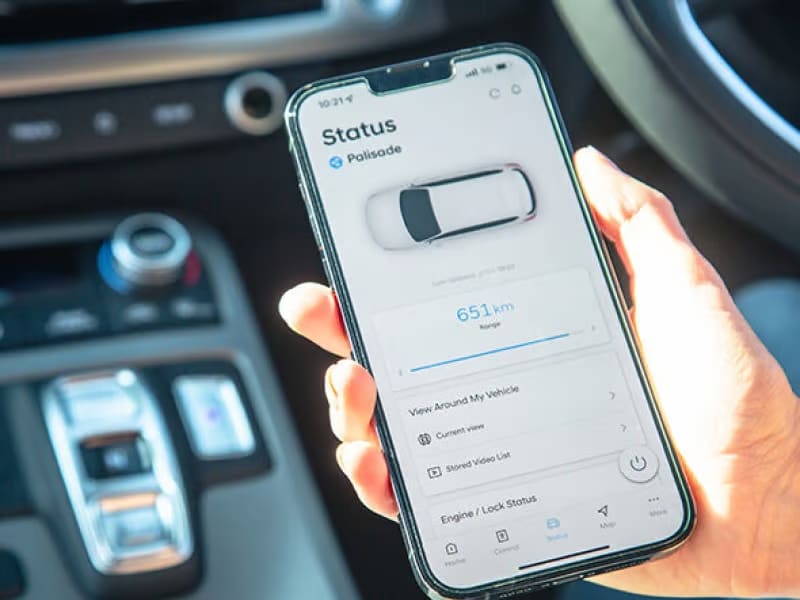
Vehicle Status.
Wherever you are*, you can monitor your Hyundai’s vital control systems, such as tyre pressure, battery, and airbags, through the Bluelink® Vehicle Health Report on your app.* You can also check fuel level, distance to empty[P7], and view a top-down diagram showing the status of doors, windows, and boot (open/closed or locked/unlocked). For electric vehicle owners, the Bluelink® app[P1] provides charging status and available range[P8], keeping you fully informed before you hit the road.

Plan your trip ahead.
With the Bluelink® app[P1], you can use the ‘Send To Car’ feature to load your trip details directly into your Hyundai’s Sat Nav from anywhere, whether at home or work. When you start your drive, your route is ready to go*. EV drivers can also schedule their vehicle’s charge to ensure it's fully powered before heading out[P1][P9].

Remote Climate Control.
The Bluelink® app[P1] allows you to remotely control your Hyundai’s climate settings from anywhere. Pre-heat or cool your car with just a tap on the app, so it’s always the perfect temperature when you get in. Ideal for those chilly mornings or hot afternoons.
While you drive

Connected Routing.
Connected Routing takes Sat Nav to the next level by calculating routes via a powerful server in the Bluelink™* cloud. It factors in real-time road conditions and traffic data to give you the fastest route available. It’s like having a traffic expert guiding your journey every time[P2].

Voice Recognition.
With Bluelink™* Voice Recognition, your words control it all. From making hands-free calls to adjusting the climate or setting navigation, you can manage everything without taking your eyes off the road, making your drive safer and more convenient.

Connect your phone.
Stay connected with Apple CarPlay™[P3] and Android Auto™[P4], allowing you to mirror your favourite smartphone apps on your Hyundai’s multimedia touchscreen. Available via plug-in or wireless connection, depending on the vehicle model.

Next-level emergency safety.
Bluelink™ provides ultimate peace of mind with Automatic Collision Notification[P5], an Emergency SOS Call Service. In the event of a severe collision, pressing the SOS button[P6] connects you with emergency services, ready to send help if needed.
After you drive

Remote Door[P2] Lock*.
No need to worry about whether you locked your car. With the Bluelink™ app[P1], you’ll receive a push notification if your Hyundai is left unlocked. You can lock or unlock it remotely using a PIN or biometric authentication, and even control windows from the app.

Find My Car.
Can’t remember where you parked? The Bluelink™ Find My Car feature will guide you back effortlessly. Whether you parked at a crowded stadium or busy city street, the Bluelink™ app[P1] uses Augmented Reality to help you navigate back to your Hyundai.

Alarm Notification.
Bluelink™ keeps your Hyundai secure around the clock. If someone attempts to break in, you’ll receive an immediate alert on your smartphone, ensuring your car’s safety at all times.
Personalised by you for your Hyundai*.
With the Hyundai Bluelink® app[P1] you can personalise all your driving and lifestyle settings for next level convenience.

My trips
Want to know how far you drove last month? Or what is the average time to and from work? No problem. Your Bluelink®* app[P1] has all the handy-to-know answers including trip histories, journey times, distances driven, average speeds and top speeds.

User profiles
With Bluelink®, you’ll never lose a setting because your profile and car settings are saved to the Bluelink-Cloud as a back-up. You can also transfer your preferences to any other Hyundai with Bluelink™.

Calendar integration
Packed calendar? Bluelink® helps ensure you’ll never miss a date. It synchronises your calendar and shows it on your Bluelink®* app[P1] home screen, so you’re not tempted to tap and swipe as you drive. You can even send your appointments addresses directly to your sat nav for instant directions.

User personalisation
The Bluelink®* app[P1] is totally customisable, so you can program it to exactly how you want it – including your favourite features such as turning the climate control on before you get to your Hyundai.
FAQs.
General
What is Bluelink® and how can I connect Bluelink® to my Hyundai?
What are the steps to activate Bluelink?
Is my phone compatible with Bluelink?
What is Hyundai Digital Key?
What type of data connection does Bluelink use?
Does Hyundai send marketing communications to Bluelink customers?
How do I know if my car has Bluelink?
Connectivity
Does my Hyundai have a data allowance? Are there charges for going over?
Which mobile network provides data? Can I choose another provider?
Will Bluelink work in areas with limited or no network coverage?
Ownership
How can I deactivate my account if I decide to sell my car?
I’ve purchased a used Hyundai and the previous owner’s Bluelink account is still connected. How do I disconnect it?
Can the previous owner continue tracking the car if they don’t deactivate their account?
I’ve sold my Hyundai but forgot to disconnect my Bluelink account. Can I do it remotely?
Whose responsibility is it to deactivate the Bluelink account when selling a car?
What is the stolen vehicle tracking and immobilisation?
Troubleshooting
How do I deactivate Bluelink?
I’m having trouble using Bluelink. Who can I contact?
What is Automatic Collision Notification (ACN)?
Will Hyundai notify me of changes to the Terms of Service?
What is a VIN/Chassis number and where can I find it?
Can I turn off push notifications?
What is the SOS emergency service?
Compatible device.
Hyundai cannot fully guarantee compatibility of your device with Bluelink® and we recommend checking functionality of your device when connected to your vehicle.
Complimentary Period.
Ends 5 years from date of first registration. Where an eligible vehicle sold from 1st June 2025 meets the necessary Hyundai dealer servicing conditions for the 7-year Extended New Car Warranty, the complimentary Bluelink subscription is also extended to seven (7) years. Subscription fees and charges may apply thereafter.
Feature support.
Feature support varies by vehicle model and variant.
Stolen vehicle/immobilisation.
Driver-assist feature only. Vehicle must have a working electrical system, including adequate battery power and mobile network coverage to operate. Owner required to obtain Police report. Vehicle location information, if available, only provided to Police. Vehicle recovery not guaranteed. Hyundai cannot guarantee responses from emergency providers. Not available if Bluelink® services are disabled or terminated.
Contact us.
Get in touch with our team using the form below.
Alternatively, contact us via on our email and number below:
customercare@hyundai.com.au
1800 186 306 (Open Monday - Friday)
8:30AM - 7:00PM AEST
Disclaimers.
Bluelink® is a registered trademark of Hyundai Motor Company.
*Bluelink® is complimentary for five (5) years from the date of first registration of a new Bluelink-enabled vehicle. Where an eligible vehicle meets the necessary Hyundai dealer servicing conditions for the 7-year Extended New Car Warranty, the complimentary Bluelink® subscription is also extended to seven (7) years. Subscription fees may apply thereafter. Driver-assist feature only. Only operate in accordance with local road rules and in safe conditions. Requires Bluelink® to be activated, a compatible device & app installation, third-party info, mobile data, network reception and GPS signal to operate. Mobile usage at the user’s cost. Not available in areas not covered by the Optus 4G/LTE network in Australia, or if services are disabled or terminated. Features and apps are subject to change. For details, see hyundai.com/au/en/owning/bluelink and view the Bluelink Manual.
[P1] Active Bluelink® subscription and Bluelink® equipped vehicle with capabilities required.
[P2] Only operate in accordance with local road rules and in safe conditions. Available only on Bluelink® connected vehicles with automatic transmission.
[P3] Apple CarPlay® requires phone with compatible version of Apple iOS and active data service. Apple® and other third parties are responsible for their respective functionality. Apple CarPlay®, Apple® and iPhone® are registered trademarks of Apple Inc.
[P4] Android Auto™ requires a device with compatible version of Android® and active data service. Google and other third parties are responsible for their respective functionality. Android Auto™ is a trademark of Google LLC.
[P5] Driver-assist feature only. Only operates if airbag deployment is detected in vehicle. Vehicle must have a working electrical system, including adequate battery power and mobile network coverage to operate. Emergency services at user’s cost. Hyundai cannot guarantee responses from emergency providers. Not available if Bluelink® services are disabled or terminated.
[P6] Driver-assist feature only. Only operates if SOS button is pressed. Vehicle must have a working electrical system, including adequate battery power and mobile network coverage to operate. Emergency services at user’s cost. Hyundai cannot guarantee responses from emergency providers. Not available if Bluelink® services are disabled or terminated.
[P7] Applicable to internal combustion engine vehicles only.
[P8] Range estimate derived from test conditions. Actual range may differ and depends on driving style and conditions.
[P9] Electric vehicle charge scheduling requires access to a charging station and is subject to certain charger specifications, performance and further conditions. Consult with your Hyundai dealer for further details.
[P10] The Hyundai Digital Key 2 feature requires a compatible mobile device, Bluelink® app installation and an active Bluelink® subscription. Features, app and specifications are subject to change. Hyundai Digital Key 2 and Digital Key 2 Touch can be shared via the Wallet app (Apple Wallet, Google Wallet and Samsung Wallet) on your mobile device. Shared keys can only be used on devices that are compatible with Hyundai Digital Key. Convenience aid only. Not intended as a permanent key replacement.
[P11] Automatic Collision Notification is a driver-assist feature only. Only operates if airbag deployment is detected in vehicle. Vehicle must have a working electrical system, including adequate battery power and mobile network coverage to operate. Emergency services at user’s cost. Hyundai cannot guarantee responses from emergency providers. Not available if Bluelink® services are disabled or terminated.
[P12] Automatic Call Services are a driver-assist feature only. Only operates if SOS button is pressed. Vehicle must have a working electrical system, including adequate battery power and mobile network coverage, for the feature to operate. Emergency services at user’s cost. Hyundai cannot guarantee responses from emergency providers. Not available if Bluelink® services are disabled or terminated.